
Paste the text, keep the design
Every website we build for a client reaches the same moment. The site is exactly right on launch day, and then the client has to publish the next news item. A page builder hands them a box that can wreck the layout. A conventional CMS hands them a form that cannot express the page. Either way, the one person who actually knows the content ends up nudging columns and picking fonts, or emailing us to do it.
CS Content Management is our answer. It is an installable, AI‑composed block CMS for client sites: the client pastes plain text and drops photos, an AI composer proposes the page as a sequence of typed semantic blocks, deterministic code validates every block, and the site’s own stylesheet renders them. Nothing in the interface offers a font, a column or a colour, because those belong to the site, not to the page. The operating principle is one sentence:
The client has editorial control, the AI has bounded compositional discretion, and the host site retains design authority.
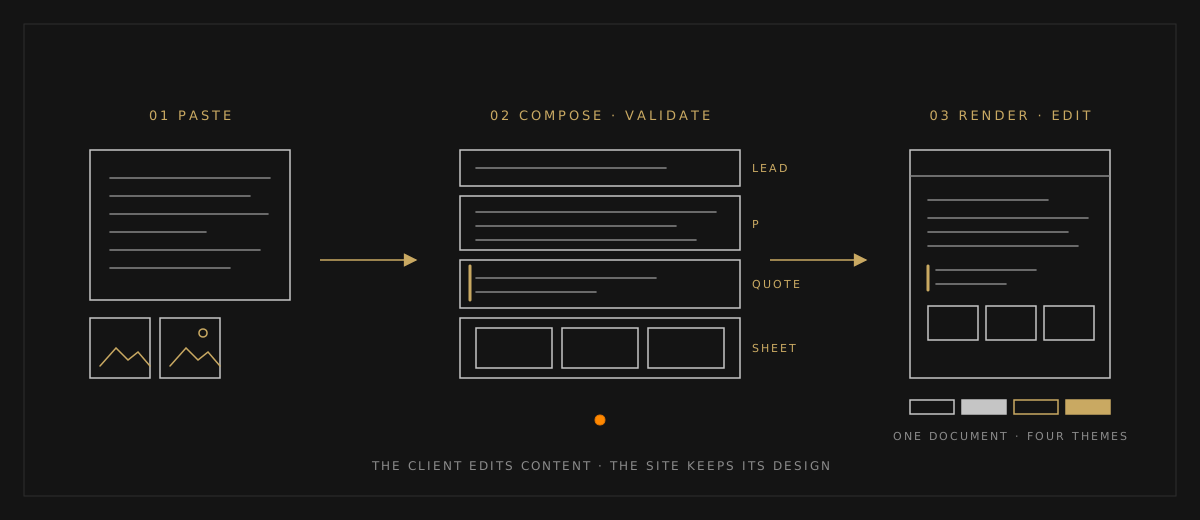
The loop has four steps:
- Paste. An editor picks a page family — news, column, event report, docs, profile — pastes text from a document, a WeChat article or a set of notes, and drops photos. Photos are downsampled in the browser and described once by a vision model, so the composer knows what each picture shows before it decides where it goes.
- Compose. The composer returns the whole page as one typed object: title, standfirst and tag in every locale, and a body built only from the vocabulary the family allows — lead, paragraph, sub‑head, list, quote, fact strip, table, figure, photo sheet. The server validates every field, every block and every photo reference; anything outside the contract is refused and one automatic repair turn asks the model to try again. The editor then reads the real page in a preview, with a change summary by block, warnings for any date, quote or link that does not occur in the pasted source, and the cost of the turn.
- Render. The renderer emits structure and class hooks, never colours or widths. A theme is a plain stylesheet. The demo site has a Theme menu that swaps between four designs on the same content, and a test asserts that the DOM is byte‑for‑byte identical under all four. The words are one thing; the look is another.
- Edit. On the live page, a click on any block opens a plain‑text form matched to its kind, so wording changes in place. Photos can be replaced, added, removed and reordered. Apparatus fields are edited in every language side by side. What the editor cannot do is change a block’s type or the page’s structure; that goes back to the composer as a sentence. Save and publish is one click, every save is a revision, any revision can be restored, and a save that would overwrite newer work is refused.
The result for the client is simple: they write, they choose pictures, they ask for changes in plain language. They never touch a design detail, and they cannot edit the site into inconsistency, because layout is locked in code and the editor only ever reaches content. Two years and two hundred posts later, the homepage and the inner pages still look like one website.
It is also cheap to run. A page from first paste to published costs little in model usage, and revision turns cost less still, because the family’s editorial prompt is cached and only the new material is paid at full price. Every model call is logged with its token counts, and an admin usage page shows spend by kind of call against daily limits, so a client can see what their publishing costs before the vendor invoice arrives.
And it is installable. Per client site we write four things: a configuration file naming the services, locales, page families and editorial voice; three thin mount points in the site’s Next.js app; a theme stylesheet, which is where the design work goes; and the site’s own header, footer and homepage. The theme is a day or two of work, done once. Everything else — composer, validator, renderer, in‑place editor, revisions, search, admin — comes from the package.
The demo site is the package’s first customer and its own documentation. Every page on it, including the docs, was composed from a plain‑text file through the same composer a client would use. The best page to start with is the one that uses every block type once — lead, paragraph, sub‑head, verse, lists, quote, fact strip, table, figure and photo sheet — so you can see the whole vocabulary on one screen. Read it, then use the Theme menu in the header to change the design under your feet:
Every block, once, on the live demo
If your organisation publishes news, reports, columns or profiles and would rather its staff focused on the writing than on the layout, start a conversation.
Publish without touching the layout
Tell us what your organization publishes and who writes it, and we’ll show you what CS Content Management would look like on your site.